May 23, 2026
Set a preferred posting time per day of the week
Until now, Suze always proposed posts at 9:00 AM. That works fine as a default, but your audience might be more active at lunchtime on Wednesdays, or in the evening on Fridays. You can now tell Suze exactly when to schedule on each day — and it will use that preference every time.
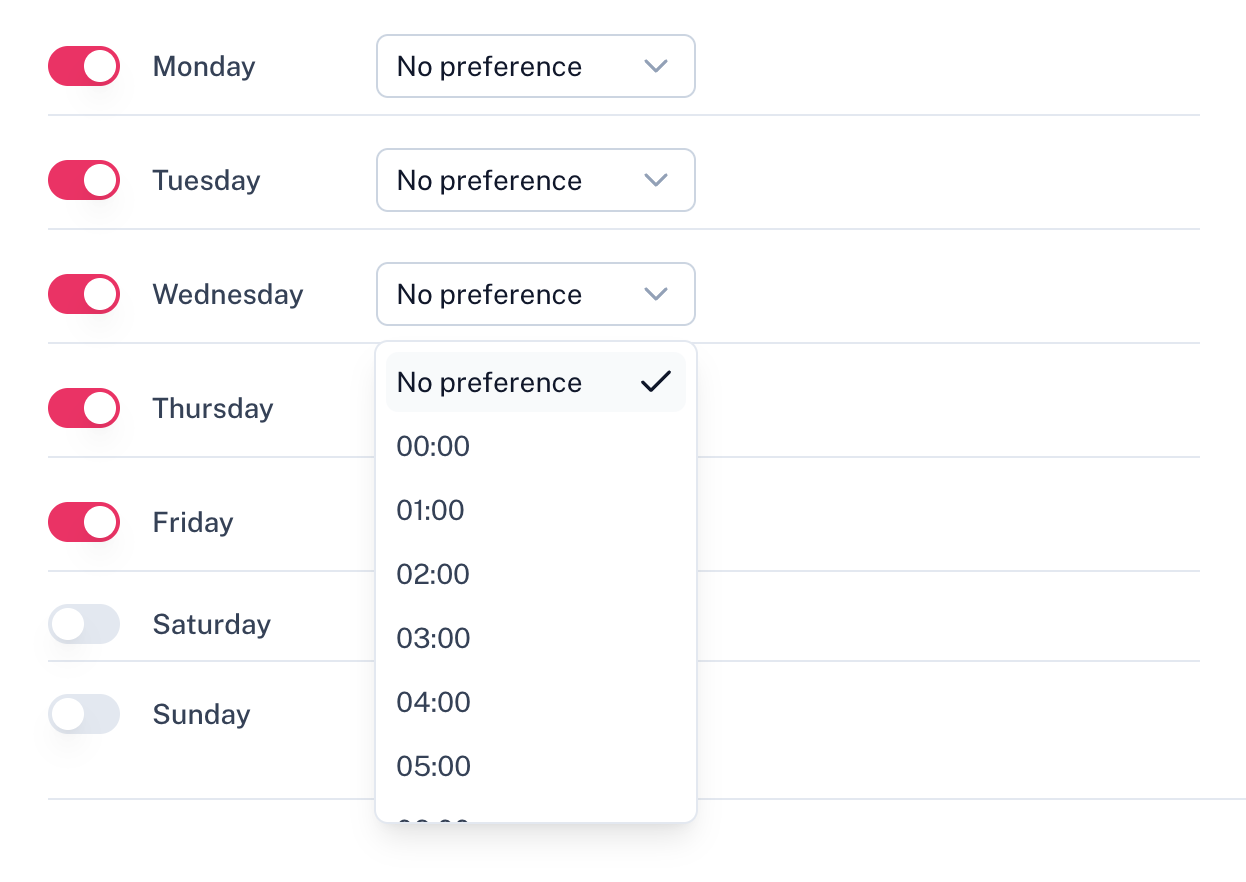
A preferred time for each active day
In your scheduling settings, every active posting day now shows a time dropdown next to it. Pick the hour that works best for that day — or leave it on "No preference" to keep the 9:00 AM default. Each day is independent, so you can set a different time for Monday than for Thursday.
Automatically applied when scheduling
When Suze schedules your approved posts, it uses the preferred time for the day each post lands on. A post proposed for a Wednesday will be set to 14:00 if that's what you configured — no manual adjustments needed.
Still fully editable per post
The preferred time is a starting point, not a lock. You can still adjust the date and time of any individual post on the calendar before confirming. The preference just means you start from the right place instead of having to change every single post.
Toggle days on or off in a cleaner list
We also redesigned the posting days section. Instead of small toggle buttons, you now get a clear list with a switch per day — easier to read and faster to configure, especially when you're also setting preferred times.